
Can I Add an Image to the Signpost?
Signposts support text, links, GIFs and uploaded videos. For still images or slides with timed questions, use a Slide & Video Activity.
Open a Signpost, choose Video, then select a video from your Media Library or upload one. Choose Save to keep it. Existing text and GIFs remain alongside the video.
A widescreen Deck Trailer is added to the entry Signpost. If there is no entry Signpost, Deck.Toys creates one near the entry point. Saving another cut updates the same trailer.
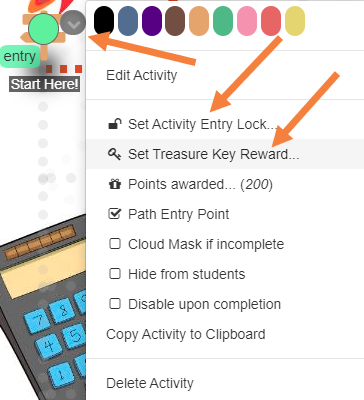
You can add Activity Entry Locks before students can enter the Signpost or reward students with Treasure Keys after completing the Signpost by clicking on the top right of the icon on the Map.
Choose Add voiceover for a cinematic narration written from your lesson: an opening hook, a build-up and a closing line. Preview it before saving or downloading. Music softens during speech. After editing the text, add voiceover again. If the lesson language is not supported, the trailer keeps its music without narration.