
Teams for Teachers
Teams give teachers a shared place for decks and classrooms. Use one for a grade-level group, department, or colleagues who teach the same class.
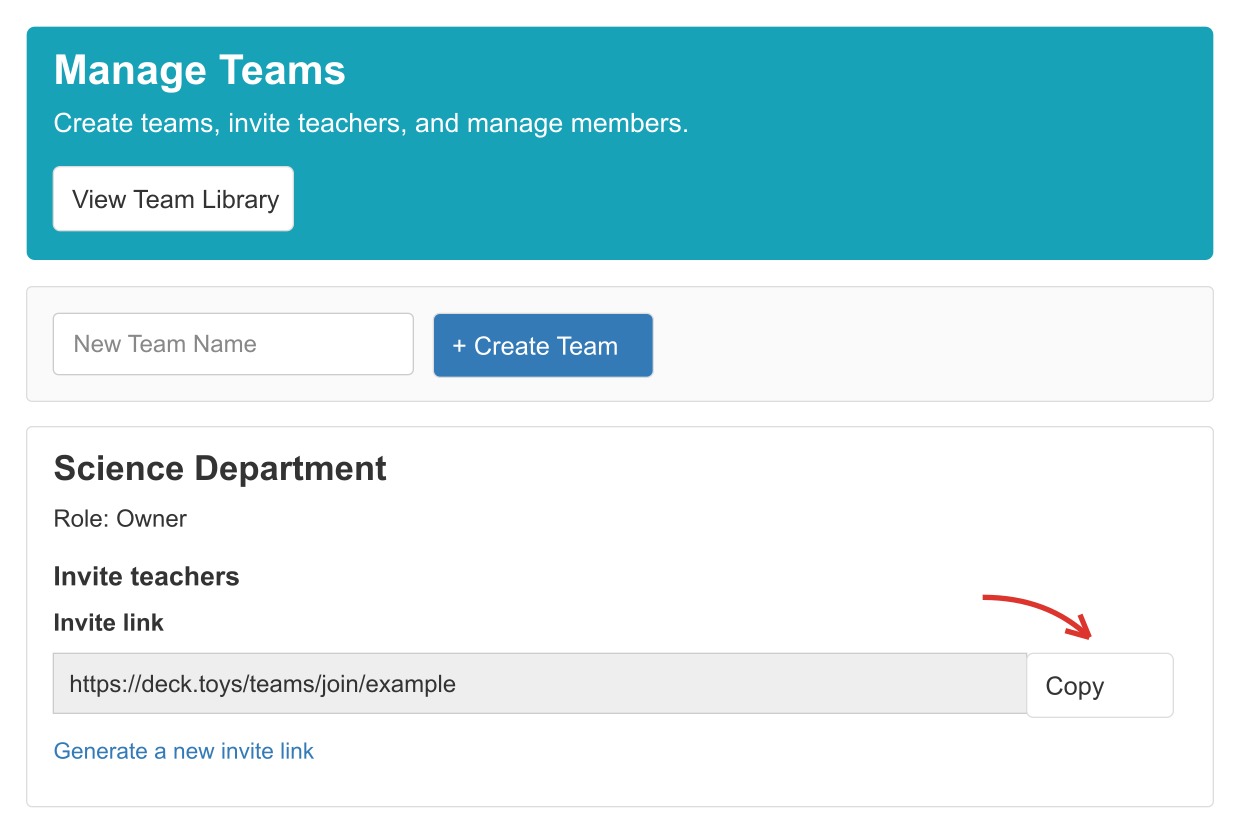
Create a Team and invite colleagues
- Open Manage Teams and enter a Team Name.
- Select Create Team.
- Under Invite teachers, copy the invitation link and send it to your colleagues.
- Review requests in Manage Teams. A teacher who opens the link asks to join; the Team owner approves the request before they can access shared materials.
Check the member list whenever your teaching group changes. Approving a request gives that teacher access to the decks and classrooms shared with the Team.
Find shared materials
Select View Team Library to browse Shared Decks and Shared Classrooms. You can preview a shared deck or assign it to your own classroom when those actions are available. Open a shared classroom's Teacher's View to teach with your colleagues, or choose View Classroom Report to review its progress.
To give one colleague access to a classroom without using a Team, see Share a Classroom with a Co-Teacher.