
Export Lesson Plans and Worksheets
Once your deck has been created and saved, open it in Deck Builder. In Assign / Share, find Export Lesson Plan, Export Teacher Guide, or Export Student Worksheet. Choose Export PDF for a document you can print or Export DOCX for a document you can edit. Open the finished file and check its questions, answers, images, and page breaks before sharing it with colleagues or students.
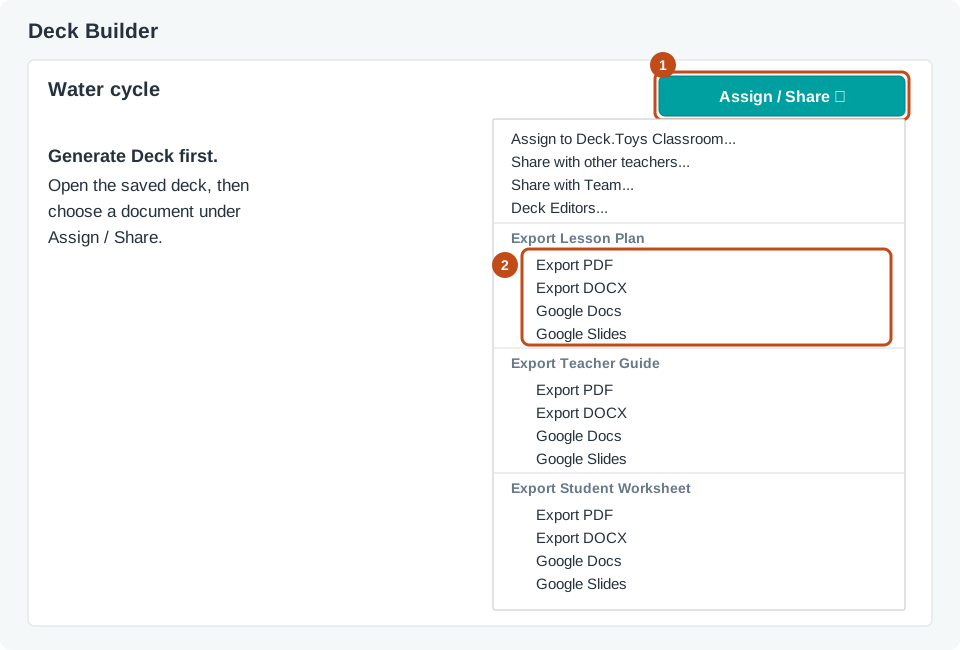
You can also choose Export in Lesson Creation Wizard after you have selected Generate Deck. If you try to export while you are still reviewing the generated lesson, the Wizard asks you to generate the deck first. Wait for the deck to be created, then choose the document and format you need.
The lesson plan and teacher guide are useful when you want a teaching copy beside your deck. The student worksheet gives students a separate document for written work. Review each export before printing or distributing it, especially if you have edited the lesson since creating the deck.