
Task Attack
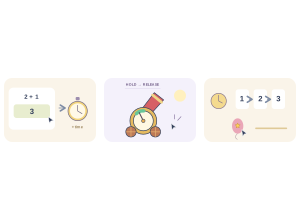
Task Attack: Students answer questions to earn time for a quick series of touch and movement tasks.
Set up
Create a Set Game, choose Task Attack in the game picker, and preview it before sharing with students. Choose a Study Set or Question Set for its questions.
How students play
- Charge bonus time. Answer the study question to gain more time for the tiny tasks.
- Follow the command. Use the shown gesture: tap, drag, swipe, or hold and release.
- Act before time. Finish the task before its timer ends; the finale chains three tasks together.
Play modes
- Multiplayer: The class tackles the same timed task sequence while the teacher follows live results.
- Challenge: Two students race through the tasks head to head.
- Single Player: One student practises the gestures and tries to beat the task timers.
- Solo Arcade: After completing the deck, a student can choose Task Attack in Student's View for the Single Player game, when Arcade play is enabled and they have Arcade time.
Teacher tip
Let students read the gesture on each task before tapping or swiping.