
Skitterkeys
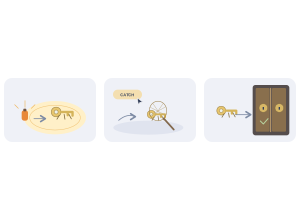
Skitterkeys: Students reveal, catch and return hidden keys to open the next floor.
Set up
Create a Set Game, choose Skitterkeys in the game picker, and preview it before sharing with students. Choose a Study Set or Question Set for its questions.
How students play
- Reveal hidden keys. Use your free flare, then answer questions to earn more light.
- Catch up close. Walk close to a skitterkey and press Catch to sweep your net.
- Return the key. Carry keys to the station gate to turn its locks and open the next floor.
Play modes
- Multiplayer: The class explores the same station, finds hidden keys and works to open its locks.
- Challenge: Two students race to find and return the keys.
- Single Player: One student searches the station, catches keys and opens its locks.
- Solo Arcade: After completing the deck, a student can choose Skitterkeys in Student's View for the Single Player game, when Arcade play is enabled and they have Arcade time.
Teacher tip
Show students how the flare reveals keys and where to return them.