
Quiz Crossing
Quiz Crossing: Students cross traffic and water, answering at quiz gates to continue.
Set up
Create a Set Game, choose Quiz Crossing in the game picker, and preview it before sharing with students. Choose a Study Set or Question Set for its questions.
How students play
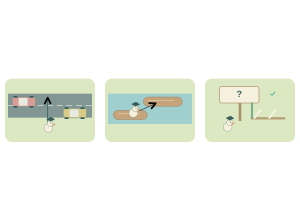
- Hop through gaps. Tap, swipe, or use arrow keys to hop past moving traffic.
- Ride the logs. Hop onto logs to cross the water safely.
- Lift the barrier. At each quiz gate, answer to lift the barrier and win a power-up. A wrong answer locks that choice for 3 seconds.
Play modes
- Multiplayer: The class crosses the same roads and rivers. Correct answers charge a crew rocket that helps classmates move ahead.
- Challenge: Two students race through traffic and quiz gates.
- Single Player: One student hops across the course and works through the gates alone.
- Solo Arcade: After completing the deck, a student can choose Quiz Crossing in Student's View for the Single Player game, when Arcade play is enabled and they have Arcade time.
Teacher tip
Practice crossing one road and one quiz gate before the full course.