
City Spotters: Paris
City Spotters: Paris
Search a hand-drawn Paris for the objects in your crew’s tray. Your Deckmate collects each find in the shared city. Fill postcards together, answer to mail them and open more districts for everyone.
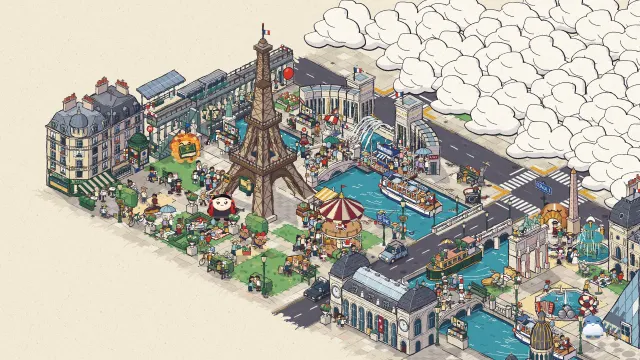
Set up
Create a Set Game and choose City Spotters: Paris. Use a Study Set with terms and definitions or images, or a Question Set with answer choices. A Study Set needs at least two different answers. Rounds last 2:00, with 1:00 and 3:00 options. Easy has fewer people and more starting hints; Hard has the full crowd. Use Preview to play or watch Demo Mode.
How students play
- Look and tap. Drag to explore; pinch or use + and − to zoom. Tap an object from your crew tray before another crew claims it.
- Fill the postcard. Crew finds fill a shared postcard. Keep searching while a crewmate stamps it.
- Stamp and mail. Answer a question to mail a full postcard. Mailed postcards open districts for the whole class. A wrong answer waits 3 seconds, then offers a fresh question.
Keyboard: arrows or WASD pan; + and − zoom; Space or Enter claims beneath the centre reticle; H uses a hint. The pin circles an area near a tray object. Earn hint +1 offers an optional question for another hint. 3 wrong taps briefly smudge the lens, then searching resumes.
Modes and classroom tools
Multiplayer shares one city, with small crews inside classroom teams. Challenge has two students racing. Single Player adds computer crewmates and rivals. Solo Arcade uses Single Player rules after deck completion, when the game is available, the teacher allows Arcade and time remains.
You can also run the shared-city game from Play Now with a Question Set.
Race a named rival to a gold Showdown item. Everyone can spot surprise visitors; the first finder takes the Golden Lens, which doubles find points. Mailing a postcard can pass the Lens to you too. The last seconds are golden hour, with extra find points. Finds, showdowns, visitors and mailed postcards earn points; results appear when time ends.
Use Launch, End and Configure. Under More, Tip for all gives students an extra hint and Surprise visitor calls a visitor when ready. Project the city to follow finds, postcards and team scores. Start with a short, familiar Set and let students search before their first question.