
Swing Squad
Create a Set Game and choose Swing Squad. Use a Study Set with terms and definitions or a Question Set, including images. Choose Preview to try it. Configure offers 1:00, 2:00 (default) or 3:00; Launch starts the class round.
Multiplayer keeps classroom teams in squads of up to four. Challenge is a 1v1 race. Single Player includes two bot squadmates. Solo Arcade uses Single Player after deck completion, subject to teacher settings and available time.
-
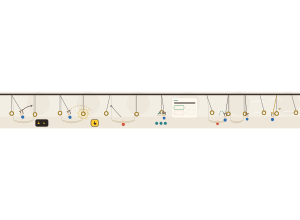
Let go Your Deckmate swings on a wooden handle. Tap the play area or finger button, or press Space, Enter or ↑ to let go on the forward swing.
-
Catch the next ring Catch the fixed brass target, separate from the moving handle. The next target glows gold when releasing now would reach it. Consecutive catches score more. The button lights up with the ring. The first few jumps give you more time to tap.
-
Missed? Hammock A miss lands softly in a hammock. You return to your last ring shortly; nobody is out.
-
Strap repair At every sixth ring, or after several misses, rest and answer. A correct answer gives three charges for quick bounce backs. Wait 3 seconds after a wrong answer; two wrong answers give one charge.
-
Your squad Up to four share a course. Catch just beyond a squadmate’s hammock to rescue them. Catch within 600 ms of each other for extra points.
-
Gusts and Golden Grip A Gust sways the targets for 8 seconds and doubles catches. Golden Grip gives its holder a gold handle and double catch points, then passes to the furthest behind. Time-up completes a started activity, whatever the score.
Catches, consecutive catches, correct answers, rescues and simultaneous catches earn points. Team scores add members’ points. Winning and completing an activity are separate: time-up completes a valid started Free Mode attempt, even with no input or correct answers. Close Activity returns to the deck; the teacher’s path and lock rules still apply.
The wind button starts a Gust (30-second cooldown). More → Golden Grip passes the gold handle to the furthest-behind player. View answers and scores in the teacher report. Keep answer choices short and use Preview before class.
If a missing game file prevents loading, the activity keeps any saved result. In Free Mode, students can close it; the teacher’s path and lock rules still apply.
If graphics stop during a classroom activity and cannot recover, the activity saves the work so far. In Free Mode, students can close it after the result is saved.