
Mastery Ladder
Mastery Ladder
Learn a set: every term climbs from Choose to Build to Recall
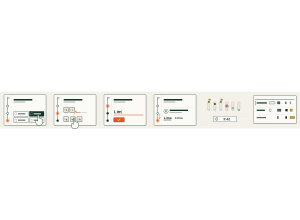
Set up
Create a Set Game and choose Mastery Ladder in Classic Games. Use a Study Set with at least two different answers, or a Question Set. A Question Set keeps its own answer choices on the Choose step. Use Preview to play or watch Demo Mode.
Choose 6, 8, 12 or all terms, up to 60. The default is 8. A round lasts 3, 5 or 8 minutes; the default is 5 minutes.
How students play
Every term sits on a three-step ladder. Each card asks the term at its current step.
- Choose. Read the prompt and tap the right answer, or press its number. A pass moves the term up a step.
- Build. Tap the pieces in order to put the answer together. Tap a placed piece, or Remove last, to take it back. The game checks the answer when every slot is filled.
- Recall. No choices now: type the answer from memory and press Check or Enter. Capital letters, extra spaces, accents and full stops do not matter. A small typo in a longer answer still passes and shows the exact spelling. I don’t know shows the answer and counts as a miss.
- Mastered. A term that passes all three steps gets a flag on the summit and is not asked again.
- Missed one? The right answer appears, the term drops one step and comes back a few cards later. Terms you pass come back after longer and longer gaps.
- Time up. The round ends when every term is mastered or the time runs out. Either way, the round is saved, however far you climbed.
Answers that are pictures, maths or very long are not typed. On those Recall cards, students think of the answer, tap I know it, and then pick it from four choices within six seconds.
Each step climbed scores 1 point, and each mastered term scores 2 more. Students see how many terms they have mastered and how many steps they have climbed.
Play modes
- Multiplayer: The teacher launches the game for the class. Everyone starts together and works on the same terms at their own pace, in a different order. Students see a class goal instead of a ranking.
- Challenge: Two students climb the same terms in the same order and can see each other’s progress. The first to master every term wins. Otherwise, the student with more mastered terms and steps wins at time up.
- Single Player: The ladder is the opponent. Reloading the page carries on from the same card. Play again starts with the terms not yet mastered.
Mastery Ladder is a Classic game and is not in the Solo Arcade chooser.
Teacher controls
Use Launch and Configure to start with the selected set and settings. During the round the projector shows one row per term with how many students are on Choose, Build, Recall and Mastered. Terms that many students miss move to the top with a Sticking point label. The side column shows class mastery, the time left, how many terms everyone has mastered, and how many students reached the summit. If your class uses groups, it also shows each group’s average.
Finish round ends the round and keeps the results visible: terms mastered by everyone, terms still climbing with the most common wrong answer, and each student’s mastered count. End closes the game. Open Report to see each student’s correct answers, wrong answers, score and time.
Typed answers are never shown on the projector.
Teacher tip
Start with 6 or 8 familiar terms and a 5-minute round. Use the Still climbing list after the round to choose what to reteach.