
Inkbloom
Inkbloom: Students bloom a shared watercolour garden by collecting buds and answering questions.
Set up
Create a Set Game, choose Inkbloom in the game picker, and preview it before sharing with students. Choose a Study Set or Question Set for its questions.
How students play
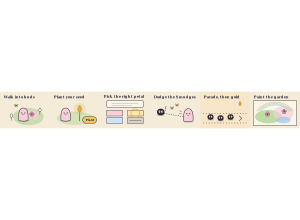
- Walk into buds. Walk with the arrow keys, a click or a drag. Every bud you touch blooms into watercolour and a butterfly follows you.
- Plant a Wonder Seed. Every bloom helps grow a golden seed. Press Plant anywhere you like and a tall sprout grows right behind you.
- Pick the right petal. The question is written by your sprout and the answers are its petals. Right, and a giant flower paints a huge patch of the garden.
Play modes
- Multiplayer: The class shares one garden, blooming buds, growing flowers and competing to paint the most ground.
- Challenge: Two students paint the same garden and try to outgrow each other.
- Single Player: One student blooms a garden alongside computer gardeners.
- Solo Arcade: After completing the deck, a student can choose Inkbloom in Student's View for the Single Player game, when Arcade play is enabled and they have Arcade time.
Good to know
Ink blots wind up, draw a dotted line, then lunge. Step aside! A hit scatters some butterflies that anyone can catch.
Teacher tip
Show students how to plant a Wonder Seed before they start painting.