
Meteor Cards
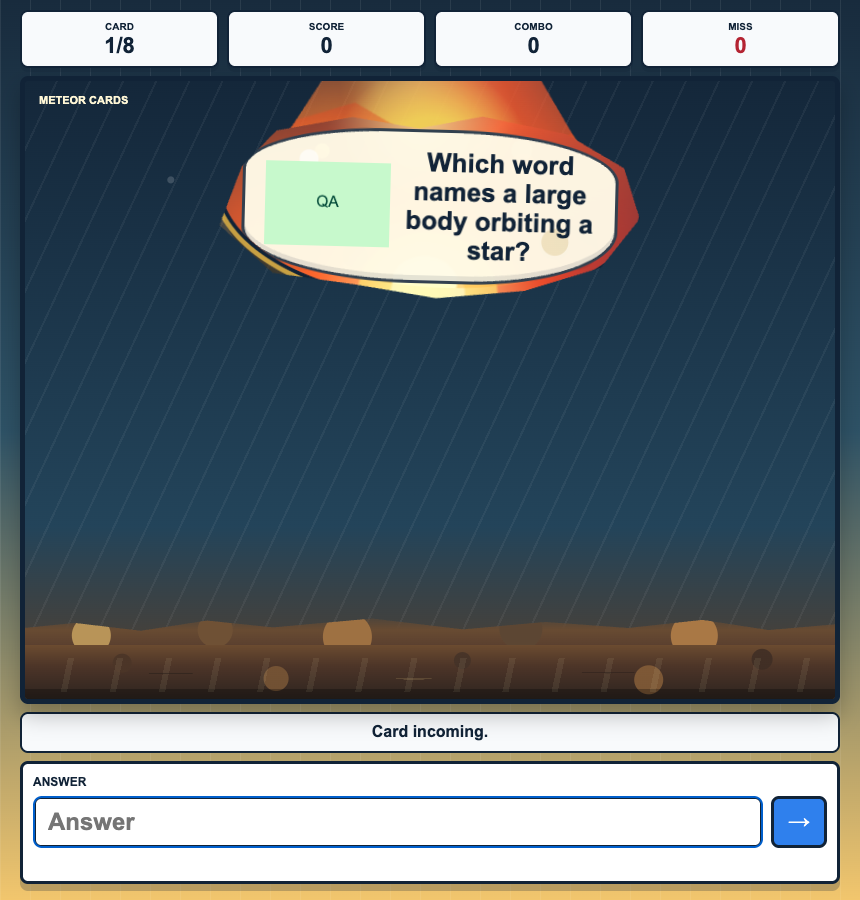 Meteor Cards is an arcade-style recall game. A meteor card falls toward the planet carrying a clue. Students must identify and submit the matching answer before impact.
Correct answers break the meteor and build a combo. A wrong answer or an unanswered impact resets the combo, making the game suitable for short, energetic retrieval practice.
Before you add Meteor Cards
- Select one Study Set or Question Set.
- Use up to 8 source items for a concise round. The game may cycle through items during the selected play time.
- Make sure terms are comfortable to type on student devices, or use the drag/select answer controls provided by the activity.
- Choose a play duration that gives students several chances to build a combo.
How students play
- Read the clue on the incoming meteor.
- Type or select the matching answer before the meteor reaches the planet.
- Submit the answer. A correct answer destroys the meteor and adds to the combo.
- Continue through the stream of meteors until time is up.
If a student answers incorrectly or lets the meteor impact, the game gives feedback and begins the next attempt. Students can keep playing rather than being removed after a mistake.
Classroom multiplayer
In Deck.Toys Classroom, each student plays an individual meteor stream using the same source material and round length. Students are not fighting over one answer; everyone has their own chance to respond.
The teacher view shows live progress and a leaderboard so you can compare correct answers, mistakes, and current performance. This makes the mode appropriate for a whole-class fluency check while preserving an uninterrupted game on each student's device.
Challenge mode
In Challenge mode, both students play equivalent meteor sequences. Correct answers carry the most weight; mistakes and completion time also affect the result.
Because the students play independently, one student's device speed does not move or remove the other student's meteor.
Single Player
In Single Player, the student attempts the meteor stream alone and concentrates on a personal score and combo. It works well for independent revision, homework, or a station rotation.
Solo Arcade
The student’s Solo chooser contains Arcade Games. This Classic Game is played through its activity in the deck or a teacher-launched round.
Teacher tips
- Use short, unambiguous answers when students are typing on phones.
- Explain that accuracy protects a combo; rapid guessing usually lowers the final result.
- Use the teacher leaderboard as a conversation starter, not only a ranking: a high number of impacts can signal that the timer is too demanding.
- Let students replay in Single Player and try to improve their own combo.