
Unscramble
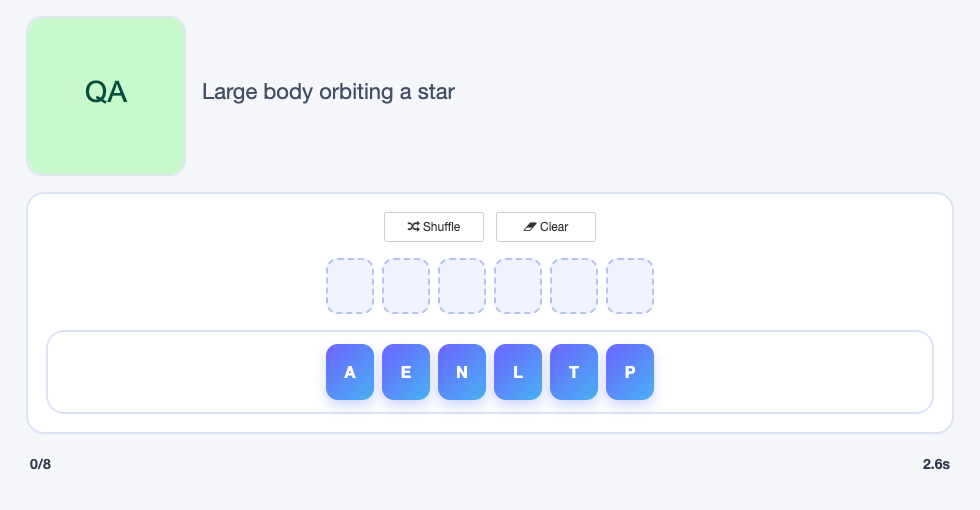 Unscramble turns each Study Set term into shuffled letter tiles. Students read the clue, move the tiles into the answer slots, and rebuild the word in the correct order.
The game is designed for spelling, vocabulary recall, and word-structure practice. It is available in Classroom, Single Player, and two-student Challenge modes.
Before you add Unscramble
- Select one Study Set or Question Set, with up to 16 source items.
- Use alphabetic terms that can be represented clearly as letter tiles.
- Add definitions or images that help students identify the target word without displaying the answer.
- Consider the term length on phones: very long answers create more tiles and require more careful dragging.
How students play
- Read the clue for the current word.
- Drag the shuffled letter tiles into the answer slots.
- Use the clear or shuffle controls if a different arrangement is needed.
- When every tile is in the correct order, the word is solved automatically.
- Continue until all selected words have been solved.
Classroom multiplayer
In Deck.Toys Classroom, each student receives an independent sequence of scrambled words. Students can work at their own pace; one student's solution does not remove a word from another student's device.
The teacher view shows live progress and results across the class, making it easy to identify students who are moving quickly, stuck on a word, or making repeated attempts.
Use this mode when you want a whole-class spelling activity but still need every student to construct every answer.
Challenge mode
Students can start a two-player Challenge from the activity in Deck.Toys Classroom. Select Challenge, choose a classmate, and wait for them to accept.
Both students receive the same scrambled word in each round. The first student to solve it scores the point, and the student with the highest score after the final word wins.
Single Player
In Single Player, the student works through the scrambled words independently. They can retry and rearrange tiles without waiting for classmates.
Single Player is well suited to homework, spelling stations, and repeated practice with difficult terms.
Solo Arcade
The student’s Solo chooser contains Arcade Games. This Classic Game is played through its activity in the deck or a teacher-launched round.
Teacher tips
- Use clues that prompt recall without simply repeating the target word.
- Group terms of similar difficulty when using the game as an assessment.
- Encourage students to say or segment the word before moving every tile.
- Use the Classroom progress view to decide which spellings need a whole-class review.