
Clear Air Crew
Help your class clear a miniature school before the Last Bell. Seal open windows, move air cleaners into hazy rooms, and answer questions for fresh filters.
Set up
Create a Set Game and choose Clear Air Crew. Select a Study Set with terms and definitions, or a Question Set with questions and choices. For a Question Set, each usable row must include question text and an answer. Images are optional clues. The game uses up to 60 usable rows.
Study Sets ask for the term from its definition; Flip Terms and Definitions reverses the direction. Question Sets ask for the answer to each question; Flip does not apply. The game uses authored wrong answers when present. Otherwise, it borrows answers from other rows or uses the prompt if no other answer is available. Up to four distinct choices appear. Use Preview to check them.
Use Configure to choose 1:00, 2:00 (default), or 3:00, then Launch the class round.
How students play
-
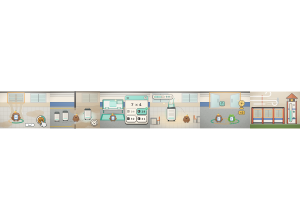
Seal open windows. Walk to an open window and hold SEAL (or Space) until it shuts. Tap or click it to walk over and close it.
-
Move cleaners. Press GRAB beside a portable cleaner, carry it to a hazy room, and press DROP. It clears nearby air. Seal leaking windows to slow new haze; they can reopen.
-
Answer at a Filter Bench. After the filter delivery arrives, press FILTER at a bench. A correct answer earns a fresh filter. After a miss, try another choice after three seconds.
Help your crew
Carry a fresh filter to a cleaner and press FIT for turbo. Each crew looks after its own wing. Two students can hold SEAL at the big front doors to close them faster; the caller can finish alone. The Golden Fan doubles its holder's points and clears nearby air.
A Gust opens every window on one side at once. Clearing rooms fills the Clear Air gauge toward three stars. The gauge shows game progress, not a real air-quality reading. Time ends the round, regardless of score.
Controls
Use the arrow keys or W/A/S/D to walk. Hold Space, E, or Enter to act; keep holding to seal a window. Click or tap a place to walk there and act on a nearby object. Drag on the school to steer with the floating stick, or use the on-screen touch controls.
At a Filter Bench, click or tap an answer, or press 1–4. Press Esc to close the question card; the clock keeps running.
Play modes
- Multiplayer: The class shares one school, with classroom teams when configured for the lesson.
- Challenge: Two students share one school on opposing teams.
- Single Player: One student plays with two bots: one bot teammate and one opposing bot.
- Solo Arcade: After deck completion, when the teacher allows Arcade, the game is available and time remains, students can play Single Player gameplay.
Points and finish
Game actions and correct answers earn points. The Golden Fan doubles its holder’s points. The gauge can award up to three stars.
In Free Mode, a valid classroom attempt that has started completes at time-up, even with no points or correct answers. Activity completion is not proof of mastery. Joining a classroom, opening Preview, or playing Solo Arcade does not complete a deck activity.
Teacher controls
Back returns to the app library while the classroom round keeps running; Back itself does not end the round. Reopen Clear Air Crew to return to its live view. To finish the round and record class results, choose End in the teacher panel. The projector shows the live school, timer, gauge, team scores and activity feed, then the round results.