
Balloon Pop
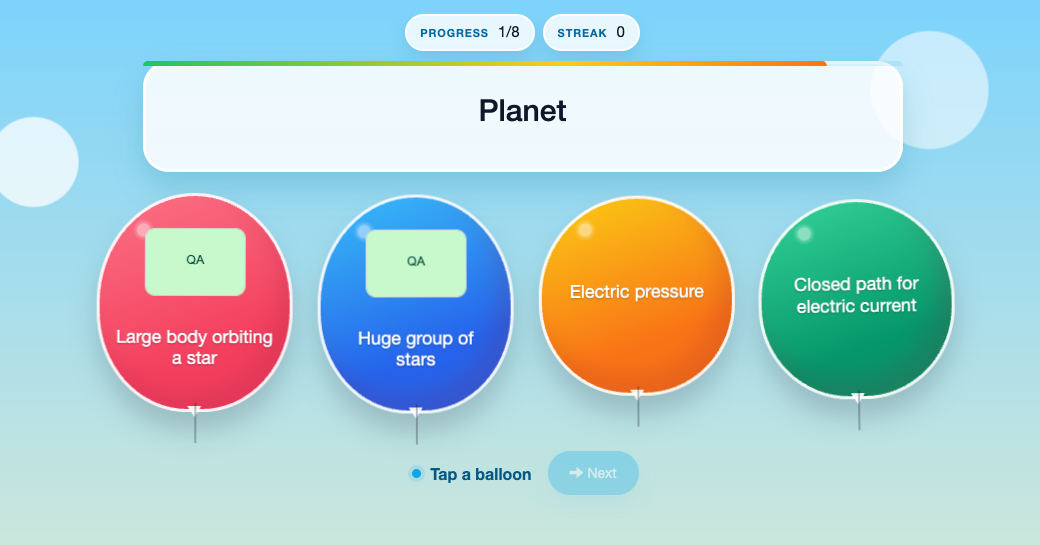 Balloon Pop is a fast multiple-choice review game. Each round shows a clue and several answer balloons. Students choose one balloon before the round is revealed, then build a streak by answering accurately.
Use it when you want the whole class looking at the same question, a short head-to-head Challenge, or an independent practice activity.
Before you add Balloon Pop
- Select a Study Set or Question Set. One Study Set is enough; a second Study Set can supply additional distractors.
- Use up to 8 source items for a compact game. Definitions, images, and question prompts can be used as clues.
- Choose a question time that gives students enough time to read every balloon.
- Choose automatic reveal for a hands-off game, or manual reveal when you want to pause for discussion.
In the Deck Builder, add a Game, choose Balloon Pop, select the source material, and adjust the timing and reveal settings.
How students play
- Read the clue at the top of the screen.
- Read the answer balloons and select the best match.
- Wait for the balloons to be revealed. A correct choice adds to the student's score and streak.
- Continue until the final round has been revealed.
A student can make only one choice per round. This encourages a considered answer instead of repeated guessing.
Classroom multiplayer
In Deck.Toys Classroom, everyone receives the same clue and answer balloons at the same time. Each student chooses on their own device while the teacher view shows who is still thinking and which answers have been submitted.
When the timer expires, every student has answered, or the teacher reveals the round manually, the answer is locked and shown to the class. Correct answers earn points and continue the student's streak. The next clue then appears for everyone together.
This mode works especially well for a teacher-led pause after each reveal: ask students why an option is correct, clear up a misconception, and then move to the next balloon round.
Challenge mode
In Challenge mode, two students receive the same timed rounds. Accuracy matters first. When both students are correct, the student who answered first receives the speed advantage for that round.
The game continues through the selected items and compares the students' results at the end. Challenge mode is useful for quick retrieval practice because both players see equivalent questions without seeing the other student's answer before the reveal.
Single Player
In Single Player, the student works through the rounds independently. The same answer-and-reveal pattern applies, but there is no opponent and no class waiting for the next question.
Use Single Player for homework, a learning station, or a calm first attempt before students enter a live Classroom game.
Solo Arcade
The student’s Solo chooser contains Arcade Games. This Classic Game is played through its activity in the deck or a teacher-launched round.
Teacher tips
- Keep answer choices similar enough to require thinking, but not so similar that students are guessing from tiny wording differences.
- Use manual reveal when you want students to justify an answer before seeing the result.
- Use a second Study Set only when its terms make plausible distractors for the first set.
- Start with a generous timer for new content, then shorten it for fluent retrieval practice.