
Word Snake
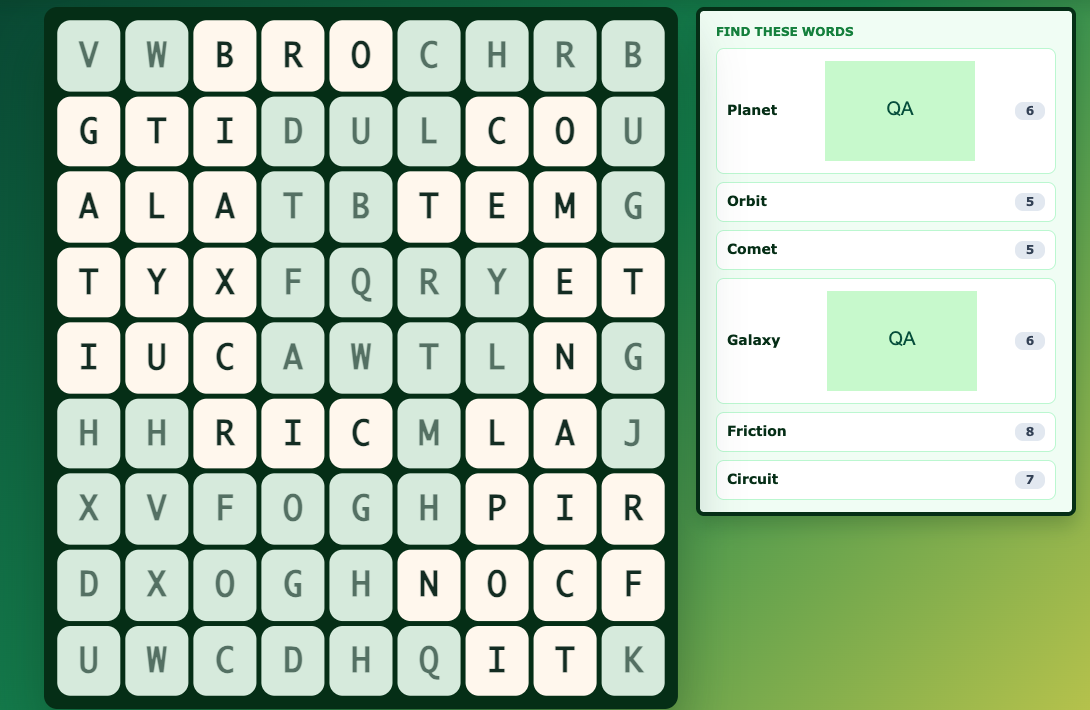 Word Snake turns the terms in a Study Set into connected letter paths. Students use the clue beside each word, find the answer in the grid, and drag across its letters in order. It works well for vocabulary review, spelling practice, and short retrieval activities.
Word Snake can be used as a teacher-led Classroom game, a two-student Challenge, or an individual Single Player activity.
Before you add Word Snake
- Choose one Study Set or Question Set.
- Use up to 6 terms. Each term can contain up to 14 letters.
- Terms must use letters only and cannot contain spaces. Shorter terms make the paths easier to read on phones.
- Definitions and images can be used as clues.
In the Deck Builder, add a Game, choose Word Snake, and select your Study Set. You can use the guided setting for clearer paths or the hidden setting for a harder recall activity.
How students play
- Read a clue in the word list.
- Find the matching term inside the letter grid.
- Drag across connected letters in the correct order.
- Release on the final letter to submit the path.
- Continue until every hidden word has been found.
A correct word stays highlighted. A wrong path is released immediately so the student can try again.
Classroom multiplayer
Launch Word Snake from your Deck.Toys Classroom. Everyone plays on the same grid and works through one shared list of words.
The first student to trace a word correctly claims it for the class. The word is then marked as complete on every student's screen, and the teacher view shows how many words each student found. The activity finishes when the class has claimed every word.
This makes Classroom mode partly competitive and partly collaborative: students race to recognise a word, but every correct answer moves the whole class toward completion.
Challenge mode
In Challenge mode, two students receive the same grid and compete over the same word list. A word can be claimed only once, so recognising and tracing it first matters.
The Challenge ends when all words have been claimed. The student who claimed more words wins; an equal number of words produces a draw.
Single Player
In Single Player, the student works through the complete grid independently. No other student can take a word, so this mode is calmer and better for individual practice, homework, or a self-paced station.
Students can retry an incorrect path immediately and continue until the whole list is complete.
Solo Arcade
The student’s Solo chooser contains Arcade Games. This Classic Game is played through its activity in the deck or a teacher-launched round.
Teacher tips
- Use 4- to 10-letter terms for the clearest paths on small screens.
- Keep clues short enough to scan quickly during a live game.
- Start with guided paths for younger learners, then switch to hidden paths for a harder review.
- Use Classroom mode when you want a shared class target and Challenge mode when you want a quick head-to-head round.